
The Python language is well-known for its simple and readable syntax. But poorly formatted or unclear Python code is difficult to;
- Read
- Understand
- Debug
No matter what type of web designing project or application you’re working on, it is important to clean up your code before implementing it or sharing it with someone.
The manual process of cleaning up your Python code can take up a lot of your time as well as effort. And, it becomes an impossible job when you are dealing with large projects. In this blog, we’re going to explore a simple and quick way to clean up your Python code.
Why Clean Up Your Python Code?
Before we get into the process of cleaning or beautifying your code, let’s discuss why it is necessary. Cleaning a code is important for various reasons, some of which are below;
- A clear code will help you to easily identify the errors, including logical and syntax errors. As a result, you can fix them quickly.
- A clear code is easier for other people to read and understand.
- A clean & beautifully structured code will reflect that you are attentive to detail. This will prove beneficial when your project is shared publicly.
- Another reason for keeping Python code clean is the smooth collaboration among team members. Any team member can work easily with beautifully organized & clear code without any confusion.
Now, let us move to the simple process of cleaning up your code.
A Step-by-Step Simple Guide to Clean Up Your Python Code
You might already know the traditional ways of cleaning up the code, like manually adjusting indentations, proper spacing, and aligning code blocks. Although these methods work, they are not simple to implement. They are prone to errors and involve a lot of effort.
Here, in the sections below, we’ll mention an advanced and simpler way that uses an online Python beautifier tool. Such types of tools are developed to let users automatically clean up as well as format their code within just a few seconds. Let’s discuss it…
Step 1: Choose A Reliable Python Beautifier Tool
The first step is to find an optimal tool. A Google search will return many options, which might overwhelm you. In this case, consider the following key features:
- We suggest you choose a faster and more accurate working tool that can instantly clean up or format even longer code, without harming its logical structure.
- You should choose the tool that follows the official style guidelines of Python, which is PEP8.
- The tool should provide you with the option to edit the input and output code.
- You should prefer the tool that highlights your code using colors. This feature will help you easily read your input and output code.
- The tool must be easier to use for you. Plus, it should offer unlimited code cleaning opportunities.
Step 2: Paste Your Code Into the Tool & Clean Up
Once you have selected a tool, it becomes effortless to clean up your Python code. All you need to do is follow these simple steps;
- Open the Python beautifier tool.
- Paste or upload your Python code that needs to be cleaned.
- Press the “Beautify” button to start the cleaning process.
- The tool will automatically reformat by doing proper spacing, formatting, and indentations.
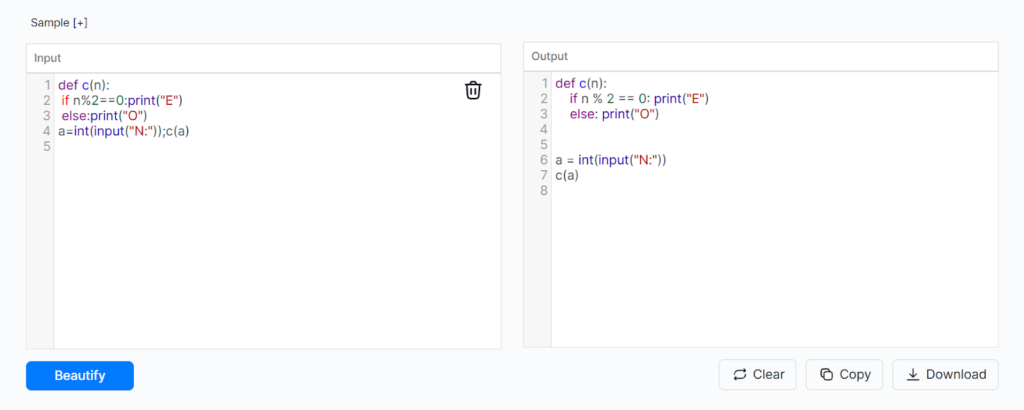
For Example:
We pasted a poorly formatted Python code into the online python code beautifier. It quickly beautified the code and provided us with clean code in the output.
Our Code:
| def c(n): if n%2==0:print(“E”) else:print(“O”)a=int(input(“N:”));c(a) |
Here’s the Demo:
Step 3: Review Your Cleaned-Up Code and Use it
After cleaning up your code, the third step is to review it and ensure that there is no change in the original logic. While the beautifier cleans up your code, it doesn’t fix logical errors in it. So, it is important to re-check the output.
Once confirmed, you can copy or download the beautified code and use it anywhere.
Conclusion
Cleaning up your Python code is important for ensuring that it is readable easier to understand and simpler to debug. The manual way of code cleaning is time consuming. It demands a lot of effort and is prone to errors as well.
So, for your convenience, we discussed a simple and efficient way that involved a python code beautifier tool. Using the tool is a quick and reliable method. It allows you to transform messy Python scripts into well-structured ones within just a few clicks.
