
It’s time to say goodbye to manually reviewing the JPG image and then extracting all of its data into a workable Excel sheet. This is because, due to the continuous advancements in the field of technology, a simple method is now available. Wondering what it is?
We are talking about specialized online tools. These offer a quick and seamless way of converting JPGs into well-formatted worksheets. This guide explains the steps you should follow.
So, without further ado, let’s get started.
Steps for Converting JPG Images into Editable Excel Files
Here are a few simple steps you need to follow to quickly convert JPGs into an Excel file with minimal effort.
- Pick a JPG to Excel Converter
First of all – you are required to explore the internet to find a suitable JPG to Excel converter that will do the job for you. Luckily, the internet is filled with a range of options, and you can pick any according to your personal preferences.
However, make sure it is reliable. Here are a few good traits of such a converter.
- Good ranking in the SERP: A good JPG to Excel converter is most likely to be the one that has a high ranking in the search engine results pages. This is because Google only gives high rankings to those who provide good results to its visitors.
- Support for multiple languages: A reliable JPG to Excel converter is capable of processing images in multiple languages.
- Comprehensive output: It is suggested to test out different converters and review how exactly they provide results. Go with the one that offers editable output in an Excel sheet format.
So, these are a few things that you can keep in mind while looking for an online JPG to Excel converter.
- Upload the Image
When you are done with the selection process, all you need to do is simply upload the JPG file to the tool. Almost every tool offers multiple uploading options, including drag/drop, copy/paste, or upload from local storage.
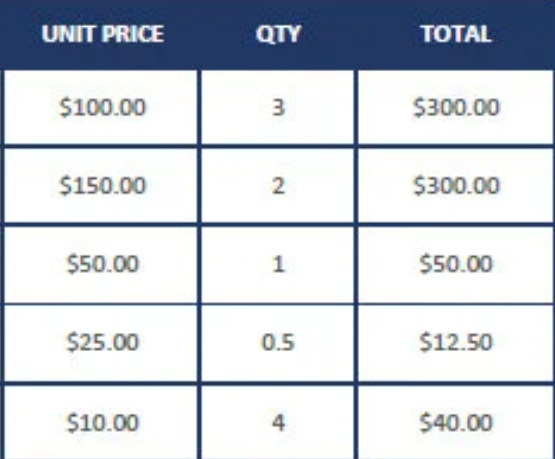
To better demonstrate, we selected a JPG to Excel converter (https://www.imagetotext.info/jpg-to-excel) and uploaded the following JPG file into it.
The image we used:
This is how the tool’s interface now looks:
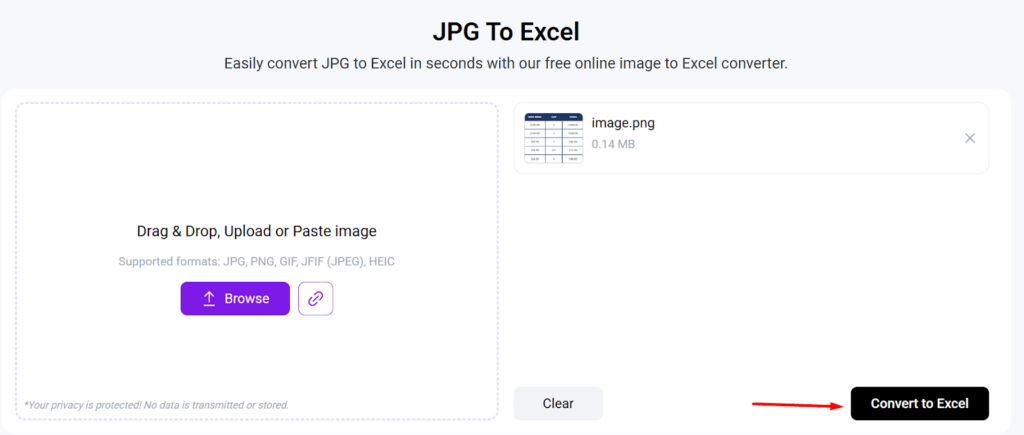
Now, simply hit the “Convert to Excel” button to kickstart the conversion process.
- Review and Download the Results
Within a few seconds of clicking the button, the tool will come up with editable output results displayed in Excel-style format. A screenshot is attached below as a reference.
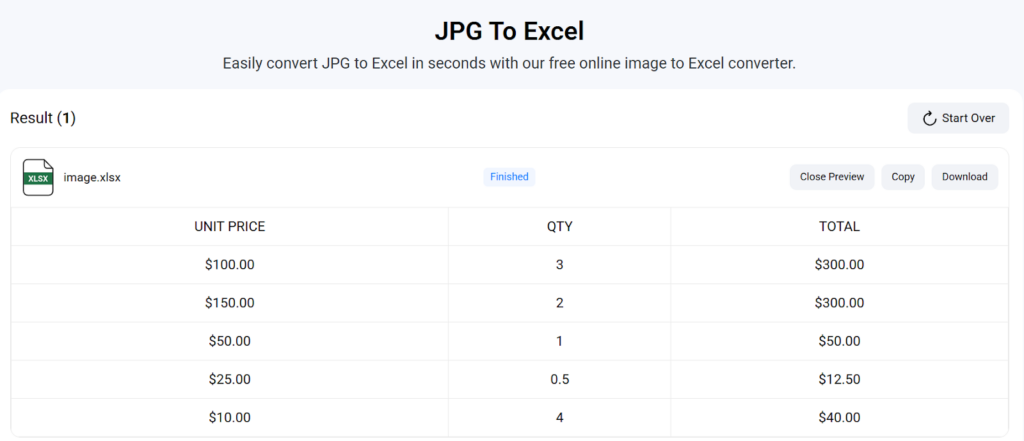
You can make edits, copy, or download the converted file in XLS format.
So, that’s it – this is how the conversion process can be seamlessly done online with great accuracy and minimal effort.
Tips to Consider to Avoid Disappointments
In order to prevent any type of disappointment and frustration, it’s better to follow the tips and tricks below.
- Process table-formatted images only: It is important to note that all JPG to Excel converters are designed to process a specific type of images that contain data in a table or structured format. Processing images (even if they are JPGs) other than these will result in an error.
- Pay attention to the quality: Although these converters are highly advanced and accurate, it is still suggested to process high-quality JPG files (in terms of resolution). A low-quality photo may make it difficult for the converter to effectively scan and perform the conversion process, increasing the overall chances of coming up with inaccurate results.
Final Words
Online JPG to Excel converters offer a simple and quick way to convert images into editable Excel worksheets. These are available for free and 100% secure. You simply need to upload the JPG file, hit the button, and get results in an editable format. In this blog post, we have explained a step-by-step procedure along with a pictorial demonstration for a better understanding.
We are quite hopeful that you will find this article valuable and interesting!
