
Introduction
Lost amidst complex languages and extensive frameworks like .NET? Many newcomers have difficulties with where to start in the Microsoft ecosystem.
C# (C-Sharp) is the beautiful, multi-purpose language that fills in the gap between the power of C++ and simplicity in Java. This tutorial offers a clear, structured path to mastering C# for web, desktop, and game development. Ready to start coding powerful applications? View our full C# Course Syllabus.
Why Students or Freshers Learn C Sharp?
Learning C# is a good choice for career beginners for the following reasons:
- Diverse Career Opportunities: It finds its application in Web Development (ASP.NET Core), Desktop Applications (WPF/WinForms), Mobile Application Development (Xamarin/MAUI), and Game Development using Unity.
- Strong Job Market: As the main language for the Microsoft Ecosystem and .NET Framework/Core, C# skills are always in demand in the job market.
- Unity Game Development: C# is the fundamental language for the Unity game engine, one of the most popular in the world, and thus offers a direct route into the gaming industry.
- Managed Language: It handles complex tasks like memory management itself with something called Garbage Collection, making it easier to learn and less error-prone, compared to C++.
- Modern Language: C# is constantly updated with modern features, meaning your skills will always be relevant and current.
Ready to land your first C# role? Access C# Interview Questions and Answers.
Check your knowledge level with our smart Knowledge Assessment Tool
- Instant skill evaluation with accurate scoring
- Identify strengths and learning gaps easily
- Designed for students and working professionals
- Smart assessment to guide your career growth
Take Your Eligibility Report Instantly
Step-by-Step C Sharp Tutorial for Beginners
This C Sharp tutorial for beginners provides a systematic, well-structured approach to learning C#, from installation and basic syntax to control flow and the key concepts behind Object-Oriented Programming.
Step 1: Installation & Setup (Visual Studio & .NET SDK)
The C# code runs on the .NET platform, with today’s modern cross-platform version just called .NET, often referenced as .NET Core. The easiest way to write C# is using the powerful Microsoft Integrated Development Environment called Visual Studio – commonly referred to as VS.
1.1 Download Visual Studio
- Go to the official Visual Studio website and download the Community edition, which is free for learners and individual developers.
- Execute the installer executable.
1.2 Select Workloads
- During the installation process, Visual Studio Installer will ask you to select Workloads.
- Select the “.NET desktop development” and/or “ASP.NET and web development” workloads.
- Click Install. This process will automatically include the latest .NET SDK or Software Development Kit, and all the compilers.
1.3 Create Your First Project
- Open Visual Studio and select “Create a new project.”
- Search for and select the template “Console App.”
- Name your project, for example, HelloWorld, and then select the latest .NET version, for instance, .NET 8.0.
- Click Create. VS will open a project with a pre-defined file, usually Program.cs.
Step 2: Your First C# Program (Hello World)
Your Program.cs file will hold the entry point for your application. With the advent of C# 9 and .NET 6, Microsoft introduced Top-Level Statements to make console applications much easier for beginners.
2.1 The Code Structure
Modern C#:
// Program.cs
Console.WriteLine(“Hello, C# World!”);
// The program executes statements sequentially from the top.
// No explicit Main method or class needed for simple programs.
For traditional C# (which you will still see in older tutorials or large applications):
using System; // Imports the System namespace (where Console lives)
namespace HelloWorld // A container for related classes
{
class Program // A blueprint for an object
{
static void Main(string[] args) // The entry point of the application
{
Console.WriteLine(“Hello, C# World!”);
}
}
}
2.2 Key Components
| Component | Description |
| Console | A static class in the System namespace used for input/output operations. |
| .WriteLine() | A static method that prints the specified data followed by a newline character. |
| using System; | A directive that allows you to use types (like Console) without writing the full name (System.Console). |
| ; | The statement terminator, required at the end of every complete statement. |
2.3 Compile and Run
- In Visual Studio click the green Play button, or press the F5 key, to build and run the application.
- The console output of this will be: Hello, C# World!
Step 3: Variables and Data Types
C# is a strongly-typed language, meaning that every variable must be declared with a specific data type.
3.1 Value Types (Store Data Directly)
| Data Type | Description | Example |
| int | Whole numbers (32-bit integer). | int age = 25; |
| double | Floating-point numbers (double precision). | double price = 19.99; |
| char | A single Unicode character (enclosed in single quotes). | char grade = ‘A’; |
| bool | Boolean value, either true or false. | bool isActive = true; |
| decimal | Used for financial and monetary calculations (high precision). | decimal salary = 50000.50m; |
3.2 Reference Types (Store Memory Address)
| Data Type | Description | Example |
| string | A sequence of Unicode characters (enclosed in double quotes). | string name = “Alice”; |
| object | The ultimate base class for all types in C#. | object obj = 100; |
| class | The blueprint for creating objects (covered in Step 7). | Car myCar = new Car(); |
3.3 Example for Variable Declaration
int counter = 0;
string message = “C# is fun.”;
double ratio = 1.618;
// The ‘var’ keyword lets the compiler infer the type (C# 3.0+)
var calculatedValue = 10.5; // Inferred as double
Console.WriteLine($”Name: {message}, Counter: {counter}”); // String interpolation
Step 4: Control Flow (Decision Making)
Control flow statements enable your program to execute blocks of code based on conditions.
4.1 The if.else Statement
int temperature = 28;
if (temperature > 30)
{
Console.WriteLine(“It’s too hot!”);
}
else if (temperature > 20) // Checks if 21 <= temperature <= 30
{
Console.WriteLine(“Pleasant weather.”);
}
else
{
Console.WriteLine(“It’s cold.”);
}
4.2 The Switch Statement
This switch statement processes one of a part of statements according to the match.
char grade = ‘B’;
switch (grade)
{
case ‘A’:
Console.WriteLine(“Excellent!”);
break; // Exits the switch block
case ‘B’:
case ‘C’: // Fall-through is explicit or not allowed; here it handles both B and C
Console.WriteLine(“Good work.”);
break;
default:
Console.WriteLine(“Needs improvement.”);
break;
}
Step 5: Control Flow (Loops)
Loops run a block of code continuously until a condition is satisfied.
5.1 The for Loop (Counted Iteration)
Used when you know the number of iterations in advance.
int count = 0;
while (count < 3)
{
Console.WriteLine($”While loop count: {count}”);
count++;
}
5.2 The while Loop (Condition-Controlled)
Executes as long as the given condition is true.
int count = 0;
while (count < 3)
{
Console.WriteLine($”While loop count: {count}”);
count++;
}
5.3 The foreach Loop (Collection Iteration)
Used to iterate over elements in a collection, such as arrays or lists.
string[] colors = { “Red”, “Green”, “Blue” };
foreach (string color in colors)
{
Console.WriteLine($”Color: {color}”);
}
Step 6: Arrays and Methods (Functions)
6.1 Arrays
Arrays store a fixed number of elements of a single data type.
// Declaration and Initialization
int[] scores = new int[4] { 90, 85, 92, 78 };
// Accessing elements (Index starts at 0)
Console.WriteLine($”Second score: {scores[1]}”); // Output: 85
// Change an element
scores[0] = 95;
// Getting the length
Console.WriteLine($”Array size: {scores.Length}”);
6.2 Methods (Functions)
Methods perform actions and return control (and optionally a value) to the caller.
// Method Definition
int Add(int a, int b)
{
return a + b;
}
// Method Call (inside the main execution flow)
int sum = Add(10, 20);
Console.WriteLine($”The sum is: {sum}”); // Output: 30
Step 7: Introduction to Object-Oriented Programming (OOP)
Essentially, C# is an Object-Oriented Programming language. The backbone of OOP is comprised of Classes and Objects.
7.1 Classes and Objects Class
A kind of blueprint or template that defines the properties and methods of an object.
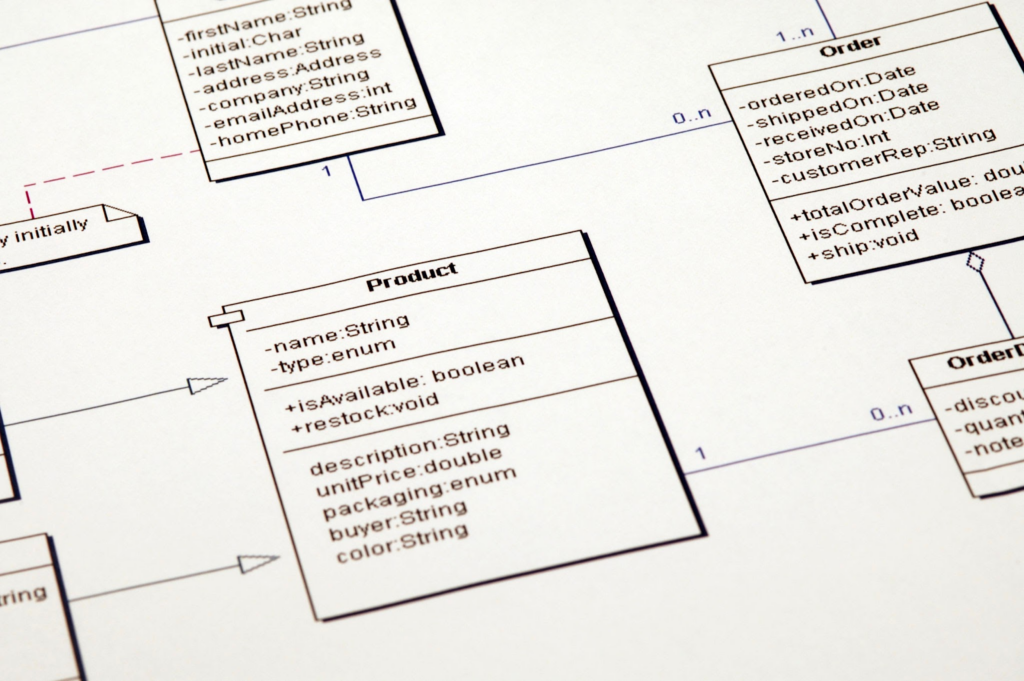
Object: An instantiation of a class.
7.2 Code Example
// 1. Define the Class (Blueprint)
public class Dog
{
// Properties (Attributes)
public string Name { get; set; } // Auto-implemented property
public string Breed { get; set; }
// Constructor (Special method called when creating an object)
public Dog(string name, string breed)
{
Name = name;
Breed = breed;
}
// Method (Behavior)
public void Bark()
{
Console.WriteLine($”{Name} the {Breed} says Woof!”);
}
}
// Main execution flow (where the objects are created)
Dog myDog = new Dog(“Buddy”, “Golden Retriever”); // 2. Create Object (Instantiation)
Dog neighborDog = new Dog(“Luna”, “Poodle”);
// 3. Use the Object
myDog.Bark(); // Output: Buddy the Golden Retriever says Woof!
neighborDog.Bark(); // Output: Luna the Poodle says Woof!
Step 8: OOP – Encapsulation (Properties)
Encapsulation is the principle of bundling data (fields) and methods that operate on that data into a single unit, called a class, and restricting the direct access to some components of the class. In C#, primarily Properties are used to implement this.
8.1 Properties vs. Fields Field:
- Field: A variable declared directly in the class (usually private).
- Property: A member supplying a flexible mechanism to read (get) or write (set) the value of a private field.
public class Account
{
// Private Field (Encapsulated)
private decimal _balance = 0;
// Public Property (Controlled Access)
public decimal Balance
{
get { return _balance; } // Getter: Returns the balance value
set
{
if (value >= 0) // Setter: Allows control (validation) before assignment
{
_balance = value;
}
// else: Ignore invalid negative input
}
}
}
Step 9: Namespaces and using
Namespaces organize code and prevent naming conflicts. The using directive allows you to refer to types within a namespace without fully qualifying them.
// Program.cs
using System; // Allows using Console instead of System.Console
using MyProject.Utilities; // Imagine a custom namespace
namespace MyProject
{
class Program
{
static void Main(string[] args)
{
// Fully qualified name:
System.Console.WriteLine(“Hello!”);
// Used because of ‘using System;’ directive:
Console.WriteLine(“Hello again!”);
}
}
}
You have now completed the basic steps in C# programming. You can now: Set up an environment for Visual Studio and create .NET Console Applications. Understand basic syntax, variables, and data types. Control the flow of execution using if/else and loops (for, while, foreach). Understand the very basics of OOP with the declaration of Classes and object formation. Further keystrokes towards C# mastery will involve a deeper look into OOP: Inheritance, Polymorphism, Abstraction, the use of STL via Collections including List<T>, and also LINQ for data querying. Ready to apply these concepts and build real applications? Access C# Challenges and Solutions.
Real Time Examples for C Sharp Tutorial for Learners
C# is a vast, versatile language developed by Microsoft, and hence indispensable across several major technology domains. Here are some real-time examples of showing the breadth of this:
Enterprise Web Applications (ASP.NET Core):
C#, combined with ASP.NET Core, represents the industry standard for developing robust, expandable, and performance-oriented web applications and APIs.
It is used for big e-commerce portals, enterprise financial dashboards, and enterprise Resource Planning systems. The server-side business logic, database interaction through Entity Framework Core, and authentication are performed with the help of the C# code.
Cross-platform Game Development with Unity:
The Unity game engine, which drives a significant chunk of the world’s 2D, 3D, and VR games, has C# as its primary scripting language.
Learners will engage in using C# to implement scripts governing gameplay mechanics, character behavior, physics interaction, and UIs. For this reason, C# is the necessary starting point for those who embark on a career in Unity game development.
Windows Desktop Applications:
Over the years, C# has become the language of choice for developing robust native Windows desktop applications.
This includes critical tools like components of Microsoft Office, advanced design software, and different business applications. Using frameworks such as Windows Presentation Foundation, developers avail themselves of C# to create visually rich and responsive Graphical User Interfaces that run directly on the operating system.
Ready to start converting these concepts into practical code? Explore our C# Project Ideas.
FAQs About C Sharp Tutorial for Beginners
1. Can I learn C# as a beginner?
Absolutely, yes! C# is an excellent language for beginners because it is modern, strongly typed, and takes care of complex tasks by itself, like Garbage Collection for memory management, making it easier to learn compared to languages like C++.
2. What are the 4 pillars of C#?
The four basic pillars of OOP in C# are Encapsulation, where data and methods, mostly through properties, are bundled; Inheritance, where new classes are created from existing ones; Polymorphism, where there is one name and multiple forms; and Abstraction, where only the essential information is shown.
3. How to start with C Sharp?
Set up Visual Studio Community and the .NET SDK, then start learning basic syntax, variables, and control flow using console applications. Then, as soon as possible, move to OOP concepts such as classes and objects.
4. Is Python or C# easier?
Generally speaking, an absolute beginner will find Python easier with its simpler, less verbose syntax and dynamic typing system. However, C# provides a better structure that guides the developer in developing greater, maintainable enterprise applications.
5. Is C# still in demand in 2025?
Yes, C# remains highly in demand and is the bedrock of the vast Microsoft ecosystem, not limited to enterprise applications and cloud services (Azure), as well as game development with the Unity engine.
6. Is C# high paying?
Yes, C# is a well-paying skill. Because C# is related to enterprise software, cloud development, and complex application architecture, it ensures very good remunerations within the .NET platform. Explore C# developer salary for freshers.
7. Is there an OOP in C#?
Yes, C# is a fully object-oriented language. In C#, everything except the primitive value types is an object, and thus C# fully supports Encapsulation, Inheritance, Polymorphism, and Abstraction.
8. Will AI replace C# developers?
No, AI won’t replace C# developers but will act like a powerful augmentation tool, such as GitHub Copilot. While AI is good at churning out boilerplate code, human developers remain important for high-level architecture, complex problem-solving, and strategic decision-making.
9. What is 80 20 rule in programming?
The 80/20 Rule, also known as the Pareto Principle in programming, can be interpreted to mean that 80% of the bugs are found in 20% of the code, while 80% of a program’s execution time is spent in 20% of its code. This guides focus for debugging and optimization.
10. Is C# a dying language?
Not at all. The language is being continuously modernized by Microsoft; for example, C# 12 and .NET 8 make this cross-platform, faster, and more versatile than ever. It remains an excellent choice nowadays for doing modern application development.
Conclusion
You have successfully finished the basic steps of C# by learning core syntax, control flow, and the basics of OOP. You are now empowered to take full advantage of the .NET ecosystem for building scalable web, desktop, and game applications.Practice consistently, then explore advanced topics like LINQ and asynchronous programming-and your skills will set in for good. Ready to turn your foundational knowledge into professional expertise? Enroll in the Full C# Course in Chennai to kickstart your career.
