Join Our 100% Job-Guaranteed Tableau Course in OMR. We Provide Quality Tableau training with an affordable Cost in OMR. Our Tableau Syllabus Covers the Tableau Desktop, data connections, calculated fields, dashboards, storytelling, data blending, and report sharing. At Softlogic Systems, you’ll earn globally recognized certifications, build real-time projects, and receive complete placement assistance to launch a successful career in your chosen field.
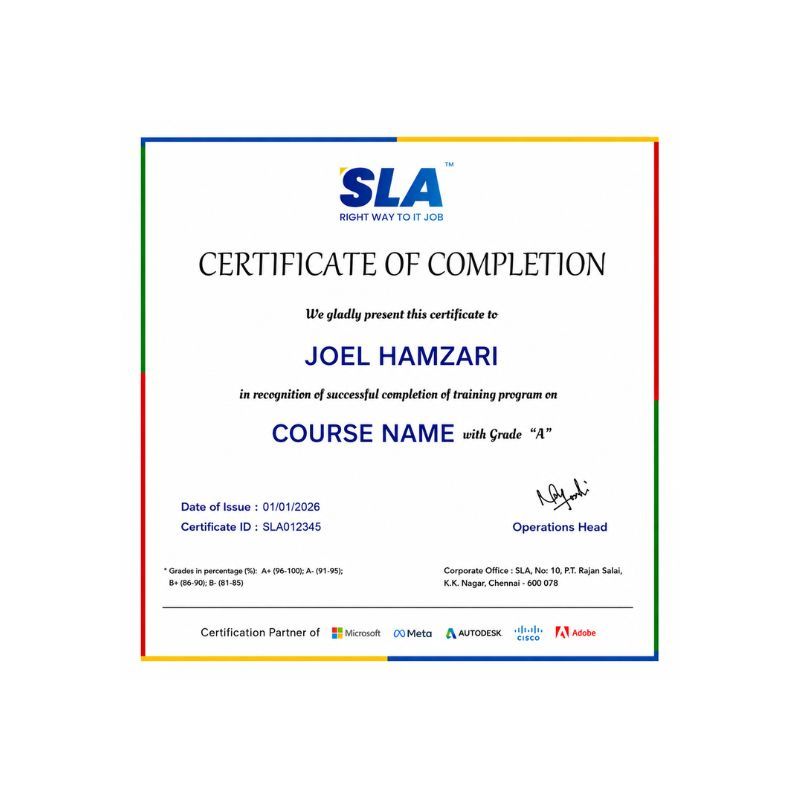
Tableau Training In OMR
DURATION
1 Months
EMI
0% Interest
Mode
Live Online / Offline
Let's take the first step to becoming an expert in Tableau
100% Placement
Assurance
Get Certified
JOB PLACEMENT ELIGIBILITY TEST
Your Placement Eligibility Report
Want more details about Tableau Course?
Course Schedules
Course Syllabus
Course Fees
or any other questions...
Fees, Duration & Batch Timings for Tableau Course
Hands On Training
3-5 Real Time Projects
60-100 Practical Assignments
3+ Assessments / Mock Interviews
June 2026
Week days
(Mon-Fri)
Online/Offline
2 Hours Real Time Interactive Technical Training
1 Hour Aptitude
1 Hour Communication & Soft Skills
(Suitable for Fresh Jobseekers / Non IT to IT transition)
June 2026
Week ends
(Sat-Sun)
Online/Offline
4 Hours Real Time Interactive Technical Training
(Suitable for working IT Professionals)
Save up to 20% in your Course Fee on our Job Seeker Course Series
Syllabus of Tableau Course
Data warehousing Concepts
- What is DWH?
- Characteristics of Datawarehouse
- Difference between OLTP and DWH
- Architecture of DWH
- Various BI tools
- Types of DWH
- Types of Dimensional Data Modeling
- Surrogate key
- Types of Dimension
Business Intelligence Concepts
- BI application types (ad hoc, standard reporting, analytic applications, dashboards) and audiences
- Specification of templates, applications and navigation framework
- Development of applications and BI portal
Tableau Desktop (Introduction)
- Introduction Tableau
- Connecting to Excel, CSV Text Files
- Getting Started
- Product Overview
- Connecting to Databases
- Working with Data
- Analyzing
- Formatting
- Introduction to Calculations
- Dashboard Development
- Sharing
- Data Calculations
- Aggregate Calculations
- User Calculations
- Table Calculations
- Logical Calculations
- String Calculations
- Number Calculations
- Type Conversion
- Parameters
- Filtering Conditions
- Filtering Measures
- Histograms
- Sorting
- Grouping
- Sets
- Tree maps, word clouds and bubble charts
- Pareto Charts
- Waterfall Charts
- Bump Charts
- Funnel Charts
- Bollinger Bands
Tableau Server
- Install Configuration
- Tab admin
- Tab cmd
- Data Server
- End User Training
- JavaScript API Intro and Embed
- JavaScript API Switching Views
- JavaScript API Filtering and Selecting
- JavaScript API Asynchronous Programming
- JavaScript API Event Listeners
- JavaScript API Advanced Filtering
- JavaScript API Utility Function
Tableau Advanced
- Authoring for Interactivity
- Data Blending
- Basic Mapping
- Advanced Mapping Techniques
- WMS Servers
- Polygon Maps
- Background Images
- Custom Geo coding
- Cubes
- Trend Lines, Residuals, and Forecasting
- Statistics Calculations
- Ben ford’s Law
- Box Plots
- Sales force
- Google Analytics
- Extract API CSV to TDE
- Connecting to Web-based Data Sources with the Extract API
- Extract API Transforming Your Data
- Analyzing Sales Data with Tableau
- Tableau Online Security and Administration
- Tableau Online Updating Data to the Cloud
Tableau Visual Analytics Training
- Introduction
- Laying the Groundwork for Visual Analysis
- Getting, Cleaning and Classifying Your Data
- Visual Mapping Techniques
- Solving Real-World Problems
- Communicating Your Findings
Objectives of Tableau Training
Our Tableau Training in OMR has one of the most updated syllabus in the realm of IT institutes. Our Tableau syllabus was curated by experts from the IT industry, while bearing in mind the current trends and standards in the IT industry. The syllabus topics range from fundamental to advanced, so the course is really open to candidates of all levels of experience. Some of the course topics are discussed below:
- The course begins with fundamental topics like, What is Data Warehouse?, Characteristics of Data Warehouse, Difference between OLTP and DWH, Architecture of DWH etc.
- The course then moves a little deeper into Tableau through topics like Business Intelligence Concepts, Specification of templates, applications and navigation framework etc.
- The course then moves to advanced topics such as, Authoring for Interactivity, Data Blending, Basic Mapping, Advanced Mapping Techniques, WMS Servers
Why Softlogic Systems is the Best Choice for Tableau Training – Learn, Practice, and Get Placed!
Online & Offline Training Options
Learn from 100+ Real-Time Developers
Hands-on Projects & Codeathons
0% EMI Fee Options
Resume & Interview Support
Placement with Top IT Firms
1000+ Hiring Partners
No Backdoor Jobs
Highlights of Tableau Course
What is Tableau?
Tableau is a highly utilized data visualization tool enabling users to build interactive dashboards and reports from diverse data sources. It empowers visual exploration, analysis, and data-driven decision-making, supporting various data formats and offering intuitive drag-and-drop functionality. Widely favored by businesses, analysts, and data experts, Tableau stands out for its user-friendly interface, powerful features, and efficient handling of large datasets.
What are the reasons for learning Tableau?
The following are the reasons for learning Tableau:
- Data Visualization Skills: Tableau enables the creation of engaging visualizations, simplifying the comprehension of intricate data sets.
- Business Intelligence: Widely employed in business intelligence and analytics, Tableau is an essential skill sought after by professionals across diverse industries.
- Data Analysis: Utilizing Tableau, large data sets can be analyzed swiftly and effectively, revealing valuable insights and trends crucial for informed business choices.
What are the prerequisites for learning Tableau Training in OMR?
SLA does not demand any prerequisites for any courses as all the courses cover topics from fundamental to advanced level. However having a basic knowledge on these below topics can be beneficial in learning the Tableau easily:
- Data Analysis: Having a grasp of data analysis principles and techniques aids in interpreting and visualizing data proficiently within Tableau.
- Data Visualization: Understanding fundamental data visualization concepts and adhering to best practices enriches your capability to craft engaging and informative dashboards and reports.
- Basic Computer Skills: Skill in using computers and software applications is imperative for seamlessly navigating Tableau’s interface and executing diverse tasks efficiently.
Our Tableau Course is suitable for:
- Students
- Job Seekers
- Freshers
- IT professionals aiming to enhance their skills
- Professionals seeking career change
- Enthusiastic programmers
What are the course fees and duration?
The Tableau course fees depend on the program level (basic, intermediate, or advanced) and the course format (online or in-person).On average, the Tableau course fees come in the range of ₹25,000 to ₹30,000 INR for 1 month, inclusive of international certification. For some of the most precise and up-to-date details on fees, duration, and certified Tableau certification, kindly contact our Best Placement Training Institute in Chennai directly.
What are some of the jobs related to Tableau?
The following are the jobs related to Tableau:
- Data Analyst
- Business Intelligence Analyst
- Data Scientist
- Data Visualization Specialist
What is the salary range for the position of Data Analyst?
The Data Analyst freshers salary typically with around less than a year of experience earn approximately ₹4-5 lakhs annually. For a mid-career Data Analyst with around 3 years of experience, the average annual salary is around ₹6 lakhs. An experienced Data Analyst with more than 5 years of experience can anticipate an average yearly salary of around ₹8-9 lakhs. Visit SLA for more courses.
List a few real time Tableau applications.
Here are several real time Tableau applications.
- Sales Performance Dashboard
- Customer Segmentation Analysis
- Marketing Campaign Effectiveness Dashboard
- Supply CHain Optimization Dashboard
Boost Your Skills with Our Tableau Training Experts
Our Mentors are from Top Companies like:
The following are our trainer’s profile for the Tableau Training in OMR:
- Our trainers hold Tableau Certified Professional credentials and have over 8 years of industry experience spanning Data Processing, Data Visualization, Data Analytics, and Business Intelligence.
- They excel as instructors, specializing in practical and expedited Tableau learning methodologies.
- Offering instructor-led, hands-on training, they optimize the Tableau learning experience to help students build a solid foundation.
- Skilled in developing Tableau dashboards, reports, visualizations, and deriving data insights, they possess extensive practical experience.
- With profound expertise in Tableau Desktop, Tableau Prep, and Tableau Server, they possess exceptional knowledge of Tableau database connection techniques.
- They are skilled in creating custom visualizations and adept at designing and deploying Tableau dashboards for web-based applications.
- Our trainers provide professional advice, guidance, and support to students for crafting effective resumes and preparing for interviews.
- They possess explicit abilities in soft skills development, logic building, and strengths assessment, crucial for achieving success in professional endeavors.
- Proficient in identifying and categorizing data patterns, they excel in working with complex ETL processes within Tableau.
- With a comprehensive understanding of Tableau data types, functions, and calculations, they are skilled in data management, query analysis, and processing.
- Having mentored over 5000 students, they bring a wealth of experience in training, mentoring, and troubleshooting Tableau issues.
- They possess knowledge in developing Tableau processes to enhance data integrity, scalability, and performance, while leveraging Tableau solutions to optimize user experience.
What Modes of Training are available for Tableau Course?
Offline / Classroom Training
- Direct Interaction with the Trainer
- Clarify doubts then and there
- Airconditioned Premium Classrooms and Lab with all amenities
- Codeathon Practices
- Direct Aptitude Training
- Live Interview Skills Training
- Direct Panel Mock Interviews
- Campus Drives
- 100% Placement Support
Online Training
- No Recorded Sessions
- Live Virtual Interaction with the Trainer
- Clarify doubts then and there virtually
- Live Virtual Interview Skills Training
- Live Virtual Aptitude Training
- Online Panel Mock Interviews
- 100% Placement Support
Corporate Training
- Industry endorsed Skilled Faculties
- Flexible Pricing Options
- Customized Syllabus
- 12X6 Assistance and Support
Certifications
Improve your abilities to get access to rewarding possibilities
Earn Your Certificate of Completion
Take Your Career to the Next Level with Certifications
Stand Out from the Crowd with Codethon Certificate
Hands-on Project Practices in Tableau Course
HR Analytics Dashboard for Employee Performance
Education Analytics for Student Performance
Customer Service and Support Analytics
Energy Consumption and Sustainability Dashboard
Marketing Campaign Performance Analysis
Supply Chain Management Dashboard
Healthcare Analytics for Hospital Management
E-commerce Sales and Customer Analysis
Financial Dashboard for Investment Analysis
The SLA Way to Get Placed in Top IT Companies
Enrollment
Technology Training
Realtime Projects
Placement Training
Interview Skills
Panel Mock
Interview
Unlimited
Interviews
Interview
Feedback
100%
IT Career
Placement Support for a Tableau Job
Genuine Placements. No Backdoor Jobs at Softlogic Systems.
Aptitude Training
from Day 1
Interview Skills
from Day 1
Softskills Training
from Day 1
Build Your Resume
Build your LinkedIn Profile
Build your GitHub
digital portfolio
Panel Mock Interview
Unlimited Interviews until you get placed
Life Long Placement Support at no cost
FAQs
How many branches does SLA have?
SLA has a total of two branches, one is in K.K. Nagar and another is in Navalur, OMR
What is the unique feature of SLA’s OMR branch?
SLA’s OMR branch has the advantage of being situated in the middle of OMR’s IT hub which provides students ample opportunities when it comes to internships and placements.
How does SLA address student grievances?
SLA addresses student grievances through the specially designated HR personnel.
Does SLA have experienced trainers?
Yes, SLA has a lot of trainers who are qualified in both the field of teaching and IT
Does SLA accept UPI payments?
Yes, SLA accepts all kinds of payments including cash, card to all types digital UPI Payments.
What is Tableau and how does it work?
Tableau is a software for visualizing data, enabling users to create interactive dashboards and reports from diverse data sources. It connects to data, transforms it into visualizations, and facilitates data analysis and interpretation.
What are the different versions of Tableau and their main features?
Tableau offers versions like Tableau Desktop, Server, Online, and Public, each tailored to specific user needs. For instance, Tableau Desktop is for data analysis, while Tableau Server enables collaboration within organizations.
How can I connect Tableau to different data sources?
Tableau provides connectivity to databases (e.g., SQL Server), spreadsheets (e.g., Excel), cloud services (e.g., Google Analytics), and big data platforms (e.g., Hadoop). Users can connect via built-in connectors or import data directly.
What are some best practices for designing effective Tableau dashboards?
Effective Tableau dashboard design involves choosing suitable visualizations, organizing data logically, using color and formatting judiciously, optimizing performance, and ensuring user-friendly navigation.
How can I optimize Tableau performance for handling large datasets?
Techniques like data extracts, efficient SQL queries, dashboard simplification, and server tuning can enhance performance, along with strategies like data aggregation and filtering for large datasets.
Additional Information for
the Tableau Course
Current Trends in Tableau
Augmented Analytics: Tableau is integrating features such as natural language processing (NLP) and machine learning (ML) to enhance data exploration and generate insights through user-friendly interactions, improving accessibility and decision-making.
Data Collaboration and Sharing: Tableau is prioritizing collaborative analytics by enabling smooth sharing and collaboration on dashboards and data visualizations, enhancing real-time teamwork and knowledge exchange among users.
Data Governance and Security: Addressing concerns over data privacy and security, Tableau is improving its data governance and security features, including better access controls, encryption methods, and compliance certifications to ensure data integrity and regulatory adherence.
Cloud Adoption: Tableau is experiencing increased adoption of cloud-based deployments due to the scalability, flexibility, and cost-effectiveness of cloud platforms. Integration with services like AWS, Azure, and Google Cloud allows organizations to leverage cloud infrastructure for data storage, processing.
Embedded Analytics: Tableau is empowering embedded analytics capabilities, enabling organizations to integrate Tableau visualizations directly into their existing applications and workflows. This integration enables users to access analytics within familiar environments, enhancing productivity and decision-making.
Mobile Analytics: To meet the growing demand for on-the-go data access, Tableau is focusing on mobile analytics with mobile-responsive dashboards and native mobile apps. This approach allows users to access and interact with data visualizations from smartphones and tablets, facilitating data-driven decision-making anytime, anywhere.
Predictive Analytics Integration: Tableau is integrating predictive analytics capabilities, allowing users to perform advanced analytics directly within the platform. By incorporating features like predictive modeling and anomaly detection, Tableau enables users to gain deeper insights and make data-driven predictions.